Acid Damage Screen

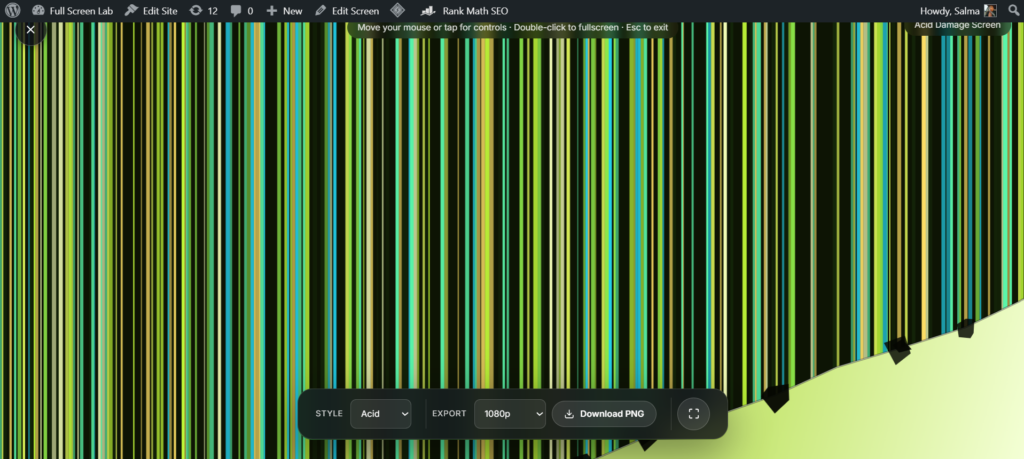
The Acid Damage Screen is a free, full screen browser tool. Toxic yellow green broken LCD with a torn peeling corner. It runs entirely in your browser, needs no install or sign up, and renders locally so nothing you see is uploaded anywhere.
How to use the Acid Damage Screen
- Click Launch fullscreen below.
- Use the on-screen controls (they fade in when you move your mouse or tap) to adjust color, speed or timing.
- Press F or double click the screen for true browser fullscreen, and Esc any time to exit.
Why use acid damage screen?
Whether you’re on a call, recording, streaming, working, or just need a quick full screen effect, the Acid Damage Screen is ready in one click no downloads, no watermark, and it works on any device with a modern browser.
Acid Damage Screen vs Liquid Damage
Both pages simulate LCD damage through color rather than cracks, so it’s worth being clear about the difference. Liquid Damage mimics blotchy, dark patches spreading like a spilled drink seeping into the display: muted, uneven, and slow. Acid Damage Screen goes the opposite direction: a bright, toxic yellow-green wash with a torn, peeling corner, built to read as chemical corrosion rather than a spill. If you want something subtler and more “oh no, did I spill something,” use Liquid Damage. If you want something louder and stranger, an “is my screen actually melting” look, this is the one.
Why a Convincing Damage Effect Works
Real LCD damage, whether from a crack, pressure, or a spill, shows up as uneven color bleeding, not a clean black screen, because the backlight and liquid crystal layer keep leaking light unevenly around the failure point. That’s why a flat “broken” graphic reads as fake instantly, but a patchy, off-color wash reads as real: it matches what people have actually seen happen to a damaged display. Acid Damage Screen leans into that color-bleed logic instead of drawing cracks, which is part of why it catches people off guard even when they’re expecting some kind of prank.
Getting the Most Out of It as a Prank
- Keep the reveal short. Most people clock a “damaged” screen as fake within ten to twenty seconds once they look closely, so the effect lands better as a quick shock than something left running.
- Use it on a device the person doesn’t own. It reads as funnier (and less alarming) on a shared or borrowed screen than on something someone would panic about replacing.
- Skip it with anyone already stressed. Like any damage prank, it’s more fun for people relaxed enough to laugh at “your screen is toast” rather than actually worry about it.
- Pair it with sound off. Since the effect is purely visual, muting notifications beforehand keeps the moment focused on the screen instead of getting interrupted.
Who This Is Built For
This suits pranksters who want a quick, visual “something’s wrong with your screen” moment, streamers who need an error or corruption beat for a transition, and horror or Halloween creators looking for an off-color, unsettling background rather than a jump-scare crack effect. If you’d rather the joke read as a spill than a chemical burn, Liquid Damage is the gentler version. If you want the crack-and-shatter look instead of a color effect, Broken Screen or Shattered Display are built around glass, not corrosion. And if broken isn’t the vibe at all, just a glitchy signal, Signal Glitch skips the damage angle entirely.
FAQ
How is this different from Liquid Damage?
Liquid Damage mimics a spill dark, blotchy patches spreading slowly. Acid Damage Screen is brighter and more chemical looking, with a torn peeling corner, built to look like corrosion rather than a spill.
Will this actually damage my screen?
No. It’s a purely visual overlay rendered in your browser. Nothing touches your display hardware, and closing the tab returns everything to normal immediately.
Does it work on mobile?
Yes. It runs on any modern desktop or mobile browser with no install, no account, and no extension required.
Do I need to download anything?
No. Everything renders live in your browser there’s nothing to download and nothing left behind after you close the tab.
Is any of my data collected?
No. Everything renders locally, and FullScreenLab doesn’t collect, store, or upload usage data from the tool itself.
Can I use it during a video call?
Yes it works well as a call background or a “wait, is your screen okay?” moment, since it’s silent and doesn’t interrupt anything else running.
Does it make sound?
No, it’s a silent visual effect only.
More Prank Screens

Critical Error Screen
Retro full-screen crash prank
Liquid Damage
Broken LCD with RGB sub-pixel bars and a torn peeling corner
Shattered Display
Broken LCD color bars with a radiating glass-shatter crack
Pixelating Screen
Screen breaks apart into corrupted blocks
Hacker Typer
Fake code, type on your keyboard