Backlight Bleed Test: How to Check Your Monitor or Laptop Screen

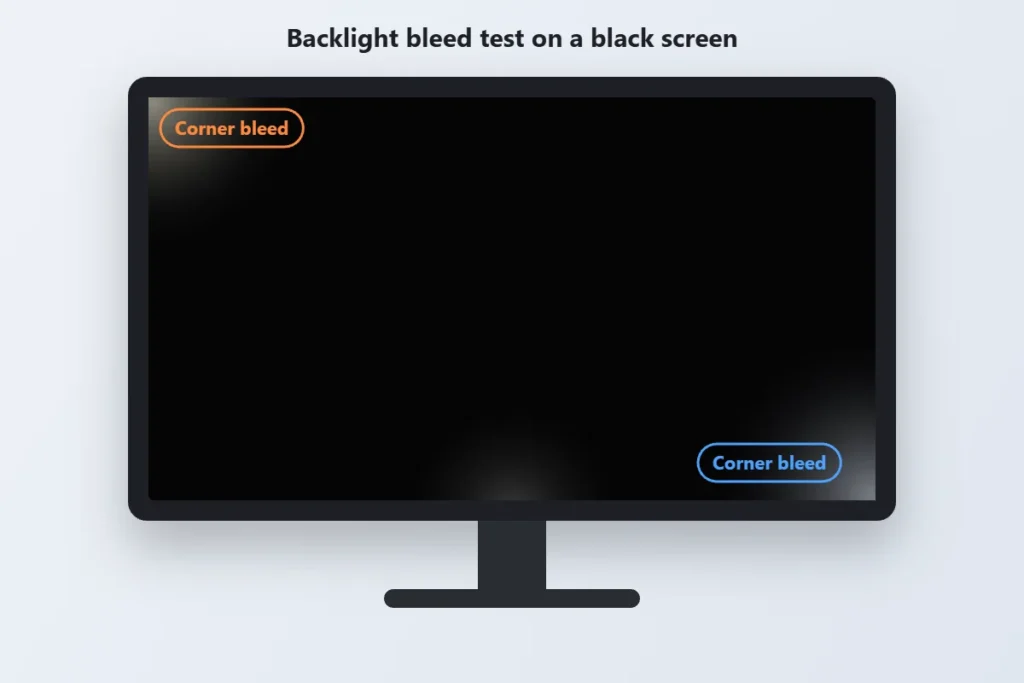
Backlight bleed is light leaking around the edges of an LCD screen, usually seen as bright or cloudy patches in the corners when the screen shows black. A backlight bleed test takes about two minutes: open a fullscreen black screen, dim the room, and look at the edges. Here is exactly how to do it, how to tell bleed from IPS glow, and what to do if your new monitor or laptop fails the test.
On this page
- What Is Backlight Bleed?
- How to Run a Backlight Bleed Test
- Backlight Bleed vs IPS Glow vs Clouding
- How Much Backlight Bleed Is Normal?
- How to Reduce Backlight Bleed
- Other Screen Tests to Run
- Backlight Bleed Test FAQs
What Is Backlight Bleed?
Most monitors and laptop screens are LCD panels. The liquid crystal layer does not make light itself. A backlight sits behind it, and the crystals block or pass that light to form the picture.
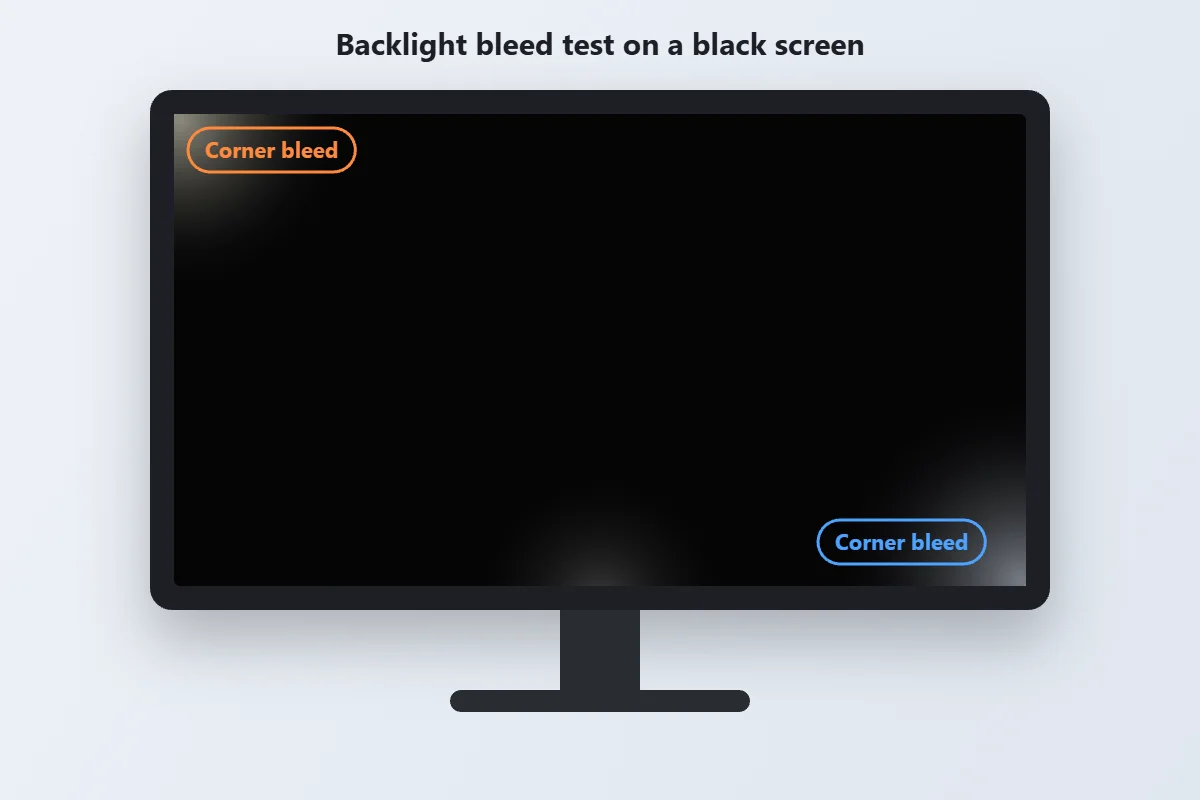
When the panel and its frame do not sit perfectly flat, some of that backlight escapes around the edges. On a bright webpage you will never notice. On a black screen, in a dark room, it shows up as a glowing patch, usually in a corner or along the bottom edge.
Common causes include:
- Uneven frame pressure: a bezel or chassis that squeezes the panel too hard in one spot.
- Manufacturing tolerance: budget panels often have looser quality control.
- Physical stress: a drop, a knock in transit, or a laptop lid that flexes when you open it.
- Heat and age: frames can shift slightly over months of use.
How to Run a Backlight Bleed Test
You do not need any software. A plain black screen and a dark room are enough.
- Let the screen warm up. Leave it on for 10 to 15 minutes so the backlight reaches normal operating temperature.
- Make the room dark. Turn off the lights and close the curtains. Bleed is easiest to see in a fully dark room.
- Open a black screen in fullscreen. Use the FullScreenLab black screen and press F11 or the fullscreen button so no taskbar or browser bar is visible.
- Set brightness to your normal level. Test at the brightness you actually use. Then try 100 percent to see the worst case.
- Sit at your usual distance, head on. Look straight at the centre of the screen from about an arm’s length away. Looking from an angle exaggerates glow.
- Check every edge and corner. Note any bright patches, their colour, and where they are.
- Take a photo if you need proof. Phone cameras exaggerate bleed on auto exposure, so lower the exposure until the photo matches what your eyes see. This matters if you plan to claim a replacement.
To check overall evenness as well, switch to a white screen and a mid grey. Darker or yellowish zones on white point to uneven backlighting rather than bleed.
Backlight Bleed vs IPS Glow vs Clouding
Three different effects can look like light leaking on a black screen. Telling them apart decides whether you have a defect or normal panel behaviour.
| Effect | What it looks like | Changes with viewing angle? | Usually a defect? |
|---|---|---|---|
| Backlight bleed | Bright, sharp edged patches at the edges or corners | No, stays in the same place | Severe bleed, yes |
| IPS glow | Silvery or warm glow in the corners | Yes, shifts or fades as you move | No, normal for IPS panels |
| Clouding | Blotchy, uneven patches across the middle | No | Heavy clouding, yes |
The quick test: move your head left, right, up and down. If the glow moves or fades, it is IPS glow. If it stays put, it is backlight bleed or clouding.
How Much Backlight Bleed Is Normal?
Almost every LCD has a little bleed if you look hard enough in a pitch dark room. A faint glow you can only see on a black screen at full brightness is generally considered normal.
It becomes a real problem when:
- You can see it in normal use, such as dark movie scenes or night mode apps.
- It is bright enough to see with some room light on.
- One corner is far brighter than the others.
- It gets worse over days or weeks.
OLED screens do not have a backlight, so they cannot have backlight bleed. If an OLED screen shows uneven dark areas, run an OLED screen test to check for burn in or uniformity issues instead.
How to Reduce Backlight Bleed
Backlight bleed is a hardware issue, so software cannot remove it. These steps can make it less noticeable or get the screen replaced.
- Lower the brightness. Bleed scales with backlight strength. Dropping brightness by 20 to 30 percent often makes mild bleed disappear in normal use.
- Add bias lighting. A soft light behind the monitor reduces contrast with the edges, so bleed is harder to see in a dark room.
- Check the stand and mounting. On desktop monitors, a tight VESA mount or a twisted stand can press on the panel. Loosening it slightly sometimes helps.
- Avoid pressing or massaging the panel. Online tips suggest rubbing the edges, but this can damage the panel and may void your warranty.
- Use the return window. If a new monitor or laptop has obvious bleed, test it on day one. Many Indian retailers only allow a short replacement window for defective products, often 7 to 10 days, so check the policy before it runs out.
- Claim the warranty. Show your photos to the brand’s service centre. Brands decide case by case, so clear photos that match what you see help a lot.
Other Screen Tests to Run
While you have the screen in a dark room, run a few more quick checks:
- Dead and stuck pixels: cycle through the red, green and blue screens and look for dots that do not change. Learn what dead pixels on a laptop screen mean, and how to fix a stuck green pixel.
- Uniformity: a white screen shows yellow tints, dark corners or a vignette.
- OLED burn in: grey and solid colour screens reveal faint leftover images on OLED panels.
Backlight Bleed Test FAQs
What is a backlight bleed test?
It is a quick check where you show a fully black screen in a dark room and look for light leaking around the edges and corners of an LCD panel.
Can backlight bleed be fixed?
Not with software. Lowering brightness and adding bias lighting can hide mild bleed. Serious bleed needs a replacement panel, so use your return window or warranty.
Is backlight bleed covered under warranty?
It depends on the brand and how severe it is. Most brands accept clearly visible bleed as a defect. Take photos that match what you see and contact the brand’s service centre.
How do I tell backlight bleed from IPS glow?
Move your head while looking at a black screen. IPS glow shifts or fades with your viewing angle. Backlight bleed stays in the same spot.
Do OLED screens have backlight bleed?
No. OLED pixels make their own light, so there is no backlight to leak. OLED screens can show burn in or uneven dark areas instead.
Does backlight bleed get worse over time?
It can. Heat, pressure on the frame and small knocks can make it worse, but mild bleed often stays the same for the life of the screen.
Can I test for backlight bleed on a laptop?
Yes. The steps are the same. Open the black screen in fullscreen, dim the room and check the edges, especially near the hinge where the lid flexes.
More Screen Tips
Monitor Refresh Rate Test: How to Check and Set Your Hz
Refresh rate is how many times per second your screen redraws the picture, measured in hertz (Hz). A…
How to Fix Screen Flickering on Windows 10 and 11
Use Task Manager to tell a driver problem from an app problem, then work through proven fixes for…
 Screen Tips
 How to Use Your Screen as a Light: Calls, Reading, Photos
Turn any phone, laptop, or monitor into a soft ring light, reading lamp, or backup light with the…